Take a Look at Vū Studio's June Release
The June 2026 release brings a smarter Vū AI assistant, new Sleep, Wake, and Exit Playback scheduling, a redesigned Display Dashboard with drag-and-drop Scene building, and a broad set of improvements and fixes across themes, PPTX rendering, and the Vū Media Server.
Planned maintenance window: Scheduled for the afternoon on release day. There should be no interruption to website availability or your online account.
Highlights
A Smarter Vū AI
Vū AI can now perform a wider range of in-app actions and is more aware of your current context, feeding relevant in-app information back to you dynamically as you work. (VU-2856, VU-2850)
Schedule Sleep, Wake, and Exit Playback
The scheduler now supports Sleep, Wake, and Exit Playback actions, so connected displays can power down, wake, and stop playback on a schedule. (VU-2562)
Drag-and-Drop Scene Building
On the redesigned Display Dashboard, you can drag and drop assets directly onto one or more displays to build Scenes. (VU-1610)
Preview Before Going Live
Preview your output before sending it Live to a connected display, so you can confirm everything looks right first. (VU-2324)
A New App Home Screen
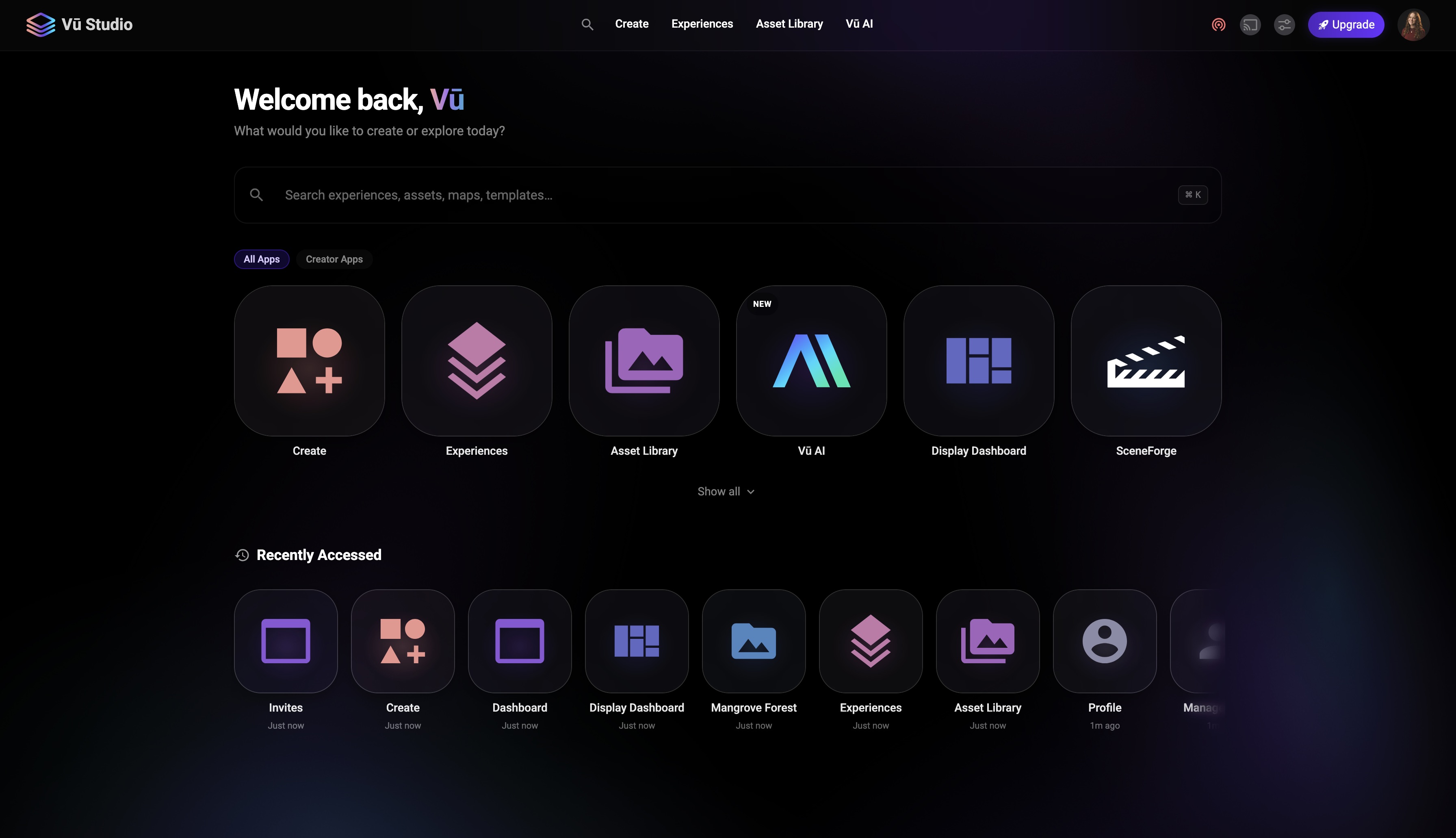
Vū Studio now opens to a new app home screen as the primary landing page. (VU-2272)
Improvements
- An interactive map prototype is now integrated into Vū Studio. (VU-2726)
- Customizable Fluidmotion-style animated backgrounds are now available. (VU-2275)
- A clear "X" button has been added to the Media modal search bar to quickly reset your search. (VU-2855)
- General UI cleanup across the dashboard for a more consistent experience. (VU-2851)
- Refined glassmorphic background colors. (VU-2817)
- Pop-ups on the Vū Media Server now include a close button. (VU-2808)
- The navbar and hamburger menu are now a single, responsive component that adapts to all screen sizes. (VU-2805)
- Display nodes now show a green/red connection indicator. (VU-2802)
- The "New Theme" button now shows a name input field when creating a theme. (VU-2784)
- A new on-media-end action can trigger a page switch after a PPTX or video finishes. (VU-2749)
- PPTX files now load faster. (VU-2747)
- Canvas design playback now persists across a web player refresh. (VU-2746)
- All team members can now see scheduled playback events created by other team members. (VU-2711)
- The connection dropdown now includes all players you have access to through your team membership. (VU-2702)
- A rotation handle has been added to all elements in the canvas. (VU-2653)
- Files can now be viewed in a list view that shows details about each file. (VU-2439)
- Integrations now live in their own folder node. (VU-2335)
- Scenes can now be created when not connected to a display. (VU-2027)
- Search results now include folders that match your search criteria. (VU-1843)
- Hardened use of the Windows media system component to prevent an error on startup. (VU-2761)
Fixes
- In some cases, layers did not reorder correctly and could disappear when editing a multi-layer Scene. (VU-2871)
- Under certain circumstances, the remote did not reset after using "Clear All Display" on players with active Scenes. (VU-2870)
- New layers were sometimes added to the bottom of the layer stack instead of the top. (VU-2869)
- In certain environments, the Player Mode window moved with page scroll in the remote. (VU-2868)
- The My Media modal and Group context could occasionally persist from a previously selected team. (VU-2862)
- In some configurations, creating a new theme from "+ New" cleared the currently loaded theme instead of saving a new one. (VU-2860)
- Scene thumbnails sometimes did not load when loading themes. (VU-2859)
- Under certain circumstances, the connection modal remained open after navigating back using the browser back button. (VU-2858)
- In some cases, a saved theme did not load its assets correctly after being created from Live Mode. (VU-2857)
- The "+ New" button could occasionally disappear after canceling theme creation. (VU-2854)
- Player size sometimes persisted incorrectly across groups. (VU-2853)
- Resolved a range of UI/UX issues affecting video playback, scrolling, and mobile views. (VU-2852)
- In certain environments, Go Live did not always send Scenes correctly. (VU-2841)
- Under certain circumstances, exiting playback from the Vū Media Server did not update the dashboard. (VU-2840)
- The theme scheduling system ran its scheduled jobs correctly, but in some cases the themes were not applied. (VU-2824)
- A "Processing…" tag could occasionally remain in the corner of the canvas, including during presentations. (VU-2821)
- On touch devices, touch-drag scrolling sometimes did not work on scroll views within websites. (VU-2804)
- In some cases, Going Live did not always show or cast the current content. (VU-2801)
- Some animated backgrounds could occasionally not respect their size and speed settings. (VU-2799)
- Shapes stroke width was inconsistent in certain configurations. (VU-2797)
- Corrected additional rendering inaccuracies in PPTX files. (VU-2790)
- Under certain circumstances, casting a PPT twice caused it to show blank in the remote preview. (VU-2788)
- The last selected player sometimes remained stuck in the navbar after exiting the dashboard. (VU-2787)
- Pagination could occasionally break for folders with more than one page of assets. (VU-2783)
- Addressed a set of regression findings on the Display Dashboard. (VU-2782)
- Improved performance of the blurred blobs in the glassmorphic background in some environments. (VU-2774)
- Corrected rendering issues affecting certain PPTX presentations. (VU-2773)
- In some configurations, a memory leak could cause the Vū Media Server to throw an error after running for more than two days. (VU-2771)
- Assets rendered in the display node preview were sometimes cut off. (VU-2766)
- Under certain circumstances, casting an existing Scene did not show the correct preview on the display node. (VU-2765)
- In some cases, Canvas Design loaded the same image asset multiple times instead of loading all selected image assets. (VU-2760)
- Corrected rendering and accuracy issues affecting certain PPTX files. (VU-2750)
- The PowerPoint system sometimes did not handle linking between slides. (VU-2731)
- PPTX files with unusual sizes sometimes did not render correctly in a 16x9 frame. (VU-2716)
- Under certain circumstances, a Scene Preset disappeared after modifying the Scene. (VU-2409)
- The Stop Experience modal could occasionally display text overflow when opening an Experience in a Session. (VU-2381)
- Integration assets sometimes did not sort correctly. (VU-1801)
To view all release notes visit HERE.
.jpg)