See What's in Vū Studio's April Release
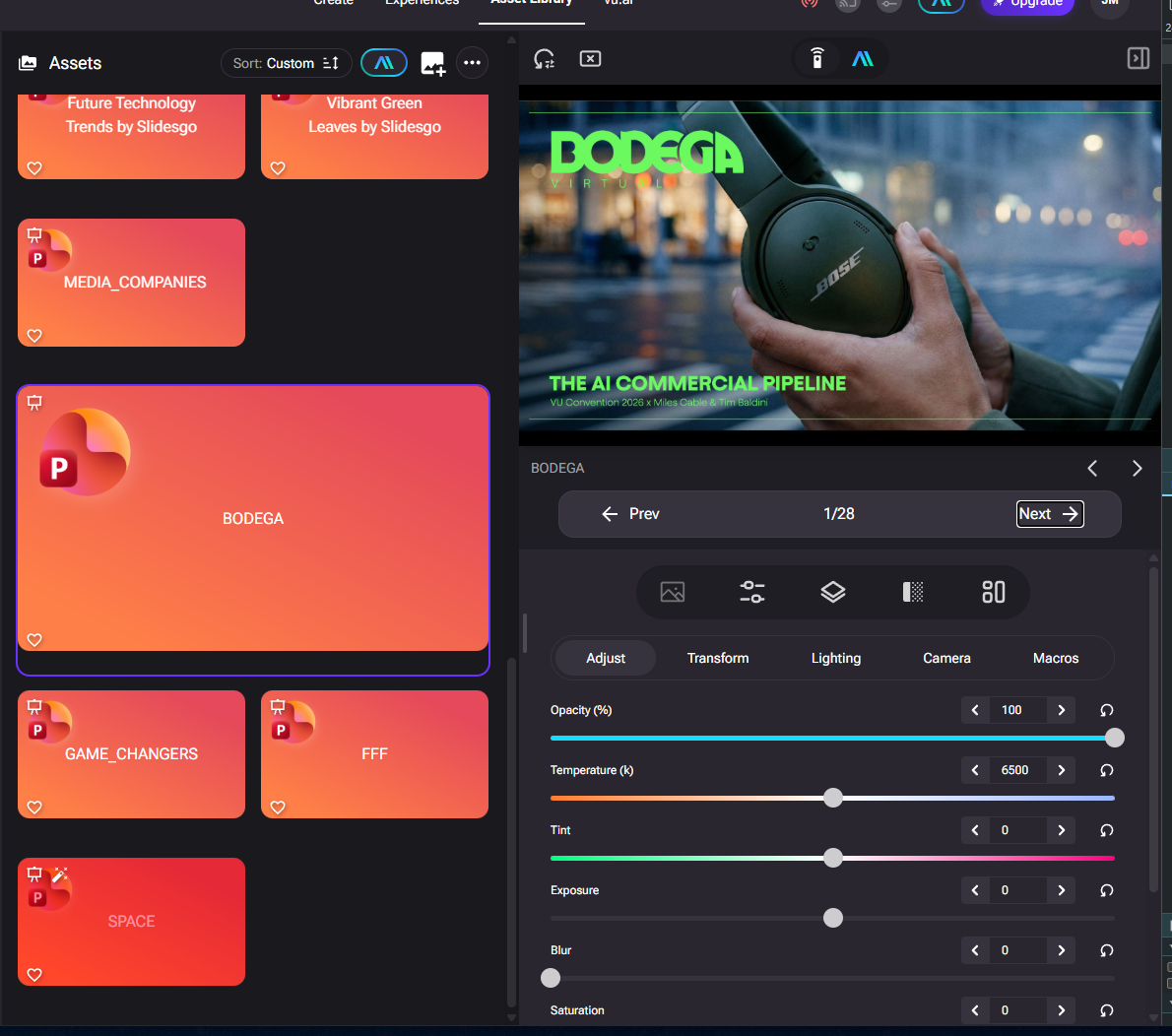
This release delivers native PowerPoint support, a redesigned Display Dashboard, a new Animated Backgrounds designer, and dozens of stability and usability improvements across Vū Studio and Vū Media Server.
Highlights
Native PowerPoint Support — Upload, preview, and play back .pptx files directly within Vū Studio. Slides render natively on the Vū Media Server and Remote with synchronized navigation across all connected views. Arrow key navigation in the web player syncs slide state back to Vū Studio in real time. (VU-2543, VU-2546, VU-2544, VU-2565, VU-2547, VU-2548, VU-2566)
Redesigned Display Dashboard — A new playback dashboard gives operators full control over all connected Vū Media Servers without requiring an active session connection. View system status at a glance, assign and schedule content per display, cast scenes to all systems simultaneously, and wake or sleep all connected systems in one action. (VU-2384, VU-2561, VU-2274)
Animated Backgrounds Designer — A new tool for creating procedural animated backgrounds is now available in Vū Studio. Build dynamic, looping background visuals using configurable parameters directly in the interface. (VU-2299, VU-2578)
Improvements
- Better Asset Thumbnails — Asset thumbnails now reflect applied visual adjustments, including contrast, exposure, and other attributes. Scene thumbnails display actual layer composition. Thumbnail aspect ratio can optionally match the currently active display. (VU-2522)
- Sony AM7 Camera Support — Added support for the Sony AM7 camera. (VU-2459)
- NDI Audio Support — NDI streams that include audio will now play audio through the Vū Media Server. (VU-2574)
- Undo / Redo — A robust undo/redo system is now available in Vū Studio. (VU-2552)
- Light Reordering in Remote — Lights and light groups can now be reordered in the Remote. Drag to reorder within groups, outside groups, and at the group level. Changes persist across sessions. (VU-2317)
- Team Ownership Transfer — Team owners can now transfer ownership of their team to another member. (VU-2326)
- Upload Status Notifications — Uploading assets now appear as toast notifications in the bottom-right corner rather than as cards in the media grid. (VU-2432)
- Folder Sorting — Folders can now be sorted by creation date or by most recently used. Sort preferences persist across devices. (VU-2416, VU-2383)
- Sharing Dialog Auto-Complete — The email field in the sharing dialog now filters team members as you type. (VU-2513)
- Scene Looping Indicator — The Remote now clearly indicates that videos within a scene will always loop. (VU-2444)
- Dynamic Asset Source Editing — A new button in the experience asset modal allows quick access to edit the source of a dynamic asset or view it in the library. (VU-2573)
- Touch Improvements for Kiosk Use — Context menus no longer appear when holding on sliders, asset previews, or folder thumbnails on touch devices. Vertical scrolling through the lighting tab no longer accidentally adjusts slider values. (VU-2489)
- Team Profile Auto-Switch — Purchasing or joining a team now automatically switches the active profile to the new team. (VU-2450)
- Improved Folder Search — Folder search logic has been improved for more accurate and consistent results. (VU-2519)
Fixes
- In some cases, animation assets did not apply the correct shader adjustments. (VU-2580)
- Not all text elements in .pptx files rendered properly in Vū Studio. (VU-2577)
- Under certain circumstances, using the environment switcher in the operator menu could corrupt configuration files, preventing the application from launching. (VU-2572)
- A .pptx file set as an overlay or background sometimes rendered in the Remote but not on the Vū Media Server when casting. (VU-2571)
- Slide index could fall out of sync between the Remote and Vū Media Server when navigating .pptx files with keyboard arrows. (VU-2570)
- Embedded videos in .pptx files displayed correctly in the Player but showed a black screen in the Remote and on the Vū Media Server. (VU-2569)
- In some configurations, .pptx asset adjustments (temperature, tint, transparency) reflected on the Vū Media Server but not in Vū Studio. (VU-2564)
- Casting .pptx files could occasionally produce intermittent errors. (VU-2560)
- The Vū Media Server was not storing pixel map state correctly, resulting in state mismatch issues. (VU-2557)
- The mouse cursor sometimes flickered when casting an asset on the Vū Media Server. (VU-2542)
- The Vū Media Server now correctly maintains light state so Vū Studio can respond appropriately when connecting. (VU-2539)
- Scene data was saving but not recalling properly in some cases. (VU-2536)
- Hide/Show and Lock asset states were not persisted after a page refresh. (VU-2532)
- Additional assets did not load when scrolling down inside a folder in some configurations. (VU-2530)
- Uploading an unsupported file type did not show a delete icon. (VU-2525)
- Generating a video using library assets in vu.ai could occasionally throw an error. (VU-2524)
- FreeD tracking did not function correctly with 2D layer depth. (VU-2521)
- Fixed several bugs in the folder share modal and account page. (VU-2520)
- YouTube videos sometimes auto-paused when resuming playback on the Vū Media Server. (VU-2514)
- Pixel mapping sometimes relied on an integrated GPU rather than the dedicated GPU in certain environments. (VU-2510)
- Pixel mapping could re-enable on assets after reloading the page. (VU-2509)
- Under certain circumstances, a stale instance of Vū Studio could appear connected while the session was no longer active. (VU-2508)
- Pixel mapping sometimes did not begin affecting lights until a user adjusted a slider. (VU-2507)
- Backgrounds and overlays could occasionally confuse the Vū Media Server's layer targeting system. (VU-2504)
- Memory usage in the watchdog service was gradually increasing over time. (VU-2503)
- Memory usage in the relay server was gradually increasing over time. (VU-2502)
- Webviews in multilayer environments did not receive click events from Vū Studio in some cases. (VU-2495)
- The Vū Media Server could become confused about which layer was being adjusted after an unrecognized state transition. (VU-2494)
- The server could silently close with no log output under certain circumstances. (VU-2491)
- Improved error handling in scene control and display handler disable logic. (VU-2488)
- In some configurations, the Scene Depth Focal Length setting was not applied correctly. (VU-2486)
- The sidebar did not close when clicking navigation links. New users could not see uploads or favorites in some cases. (VU-2485)
- Text assets displayed a black screen on the Vū Media Server instead of rendering correctly. (VU-2483)
- Scenes configured as a theme did not play back properly when triggered through the theme system. (VU-2477)
- Folders were not displayed after using search inside a folder and navigating back in the Select Media modal. (VU-2474)
- The Select Media modal sometimes showed assets from a previously opened folder when returning to the main folder view. (VU-2473)
- The Remote displayed background video playback time instead of the main video's playback time. (VU-2470)
- Navigating back to the first asset in a list automatically returned to the second asset when it was a scene. (VU-2445)
- Microsoft account login failed in some environments. (VU-2438)
- MQTT occasionally failed to connect from the Bun server. (VU-2420)
- The Vū Media Server remained in 360 mode after casting a 2D asset in some cases. (VU-2415)
- The "Exit on Playback" end behavior setting was ignored on the Vū Media Server — videos looped instead of exiting. (VU-2398)
- The file size limit for .pptx files has been removed with the introduction of the native presentation renderer. (VU-1603)
To view previous release notes visit HERE.