Turn Your Content Into an Interactive Experience With Vū Studio Galleries
%20(1).gif)
Your content library can be more than a collection of files. With the new Gallery app in Vū Studio, you can turn images and videos into dynamic visual experiences that are ready to display, explore, and interact with.
Whether you’re creating an event activation, digital signage experience, branded environment, presentation, or interactive display, Galleries gives you a simple way to bring visual content together and make it more engaging.
One place for your visual content
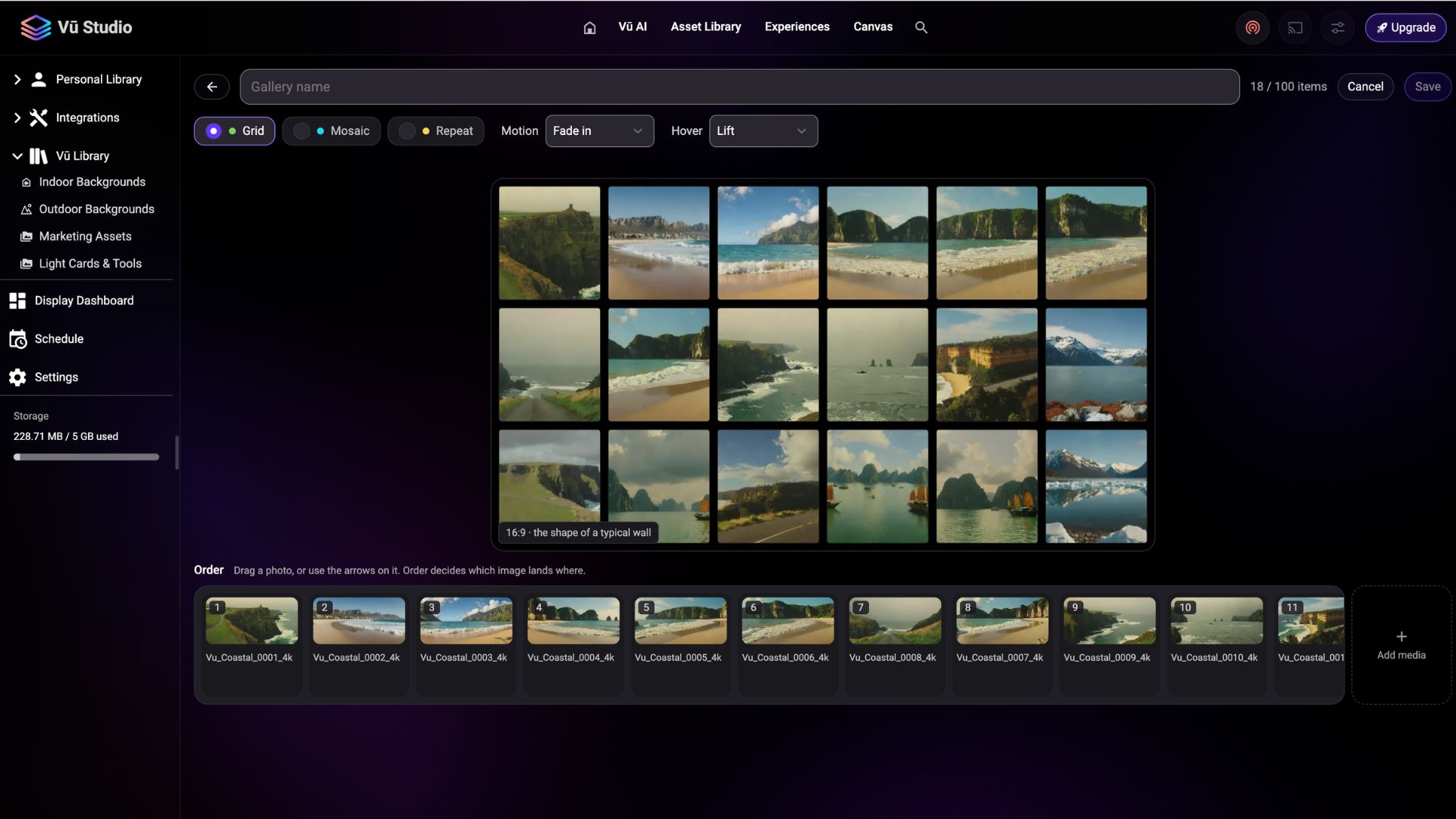
The Gallery app gives you one place to create, browse, search, edit, and cast galleries. Start by selecting images and videos from your Vū Studio Library, arrange them in the order you want, and choose how they appear on screen.
You can create a Grid for a clean, organized presentation or a Mosaic for a more dynamic visual layout. The Repeat option can turn a logo or collection of images into a branded backdrop, making it useful for event environments, step-and-repeats, digital signage, and branded spaces.
For more movement, Motion creates an ambient visual experience, while interactive Hover effects can make a gallery respond to the people viewing it. The Lens effect, for example, magnifies cells as someone moves across the display and can even roam automatically when the display is being used without a mouse.
Built for events, activations, and more
Galleries can be used anywhere you want to turn a collection of visual content into an experience.
At an event or trade show, you could create a gallery featuring products, speakers, sponsors, event photography, or campaign imagery. At a brand activation, a gallery can become an interactive way for attendees to explore content rather than simply viewing a static screen.
For digital signage, Galleries can transform a display into a constantly changing visual canvas. A collection of branded imagery, product photography, or campaign assets can become an engaging display without requiring every image to be built into a separate experience.
Galleries can also be useful in corporate environments, education, hospitality, and presentations. Showcase work, highlight projects, display photography, or create an immersive visual backdrop that complements the space around it.
The key is that the same content can be used in different ways depending on the environment. A folder of images in your library can become a visual gallery, an interactive display, or part of a larger experience.
Create a gallery in just a few clicks
There are two simple ways to create a Gallery in Vū Studio.
You can open the Gallery app from the Home screen and select the images and videos you want to use. From there, you can organize your content, choose a layout and effects, and save the finished gallery to your Library.
Or, if you already have your content organized in a Library folder, you can simply right-click the folder and select Create Gallery. Vū Studio automatically turns the folder's images and videos into a gallery, giving you a faster way to turn existing content into something ready to display.
Galleries created from folders are saved as snapshots. If you add new content to the folder later, simply choose Create Gallery again to refresh the gallery.
Once created, your galleries live alongside your other Vū Studio assets and can be cast to your displays just like any other asset.
From content library to experience
The new Gallery app makes it easier to get more out of the content you already have. Instead of treating images and videos as individual files, you can organize them into experiences designed for the space, audience, and moment.
Whether you’re building an interactive event experience, branded digital signage, an immersive presentation, or a visual showcase, Vū Studio Galleries gives you a flexible way to bring your content to life.
Your content is already there. Now, it can do more.
To learn more about the new Gallery app click HERE.