BLOG
Take a Look at Vū Studio's August Release
August 26, 2026
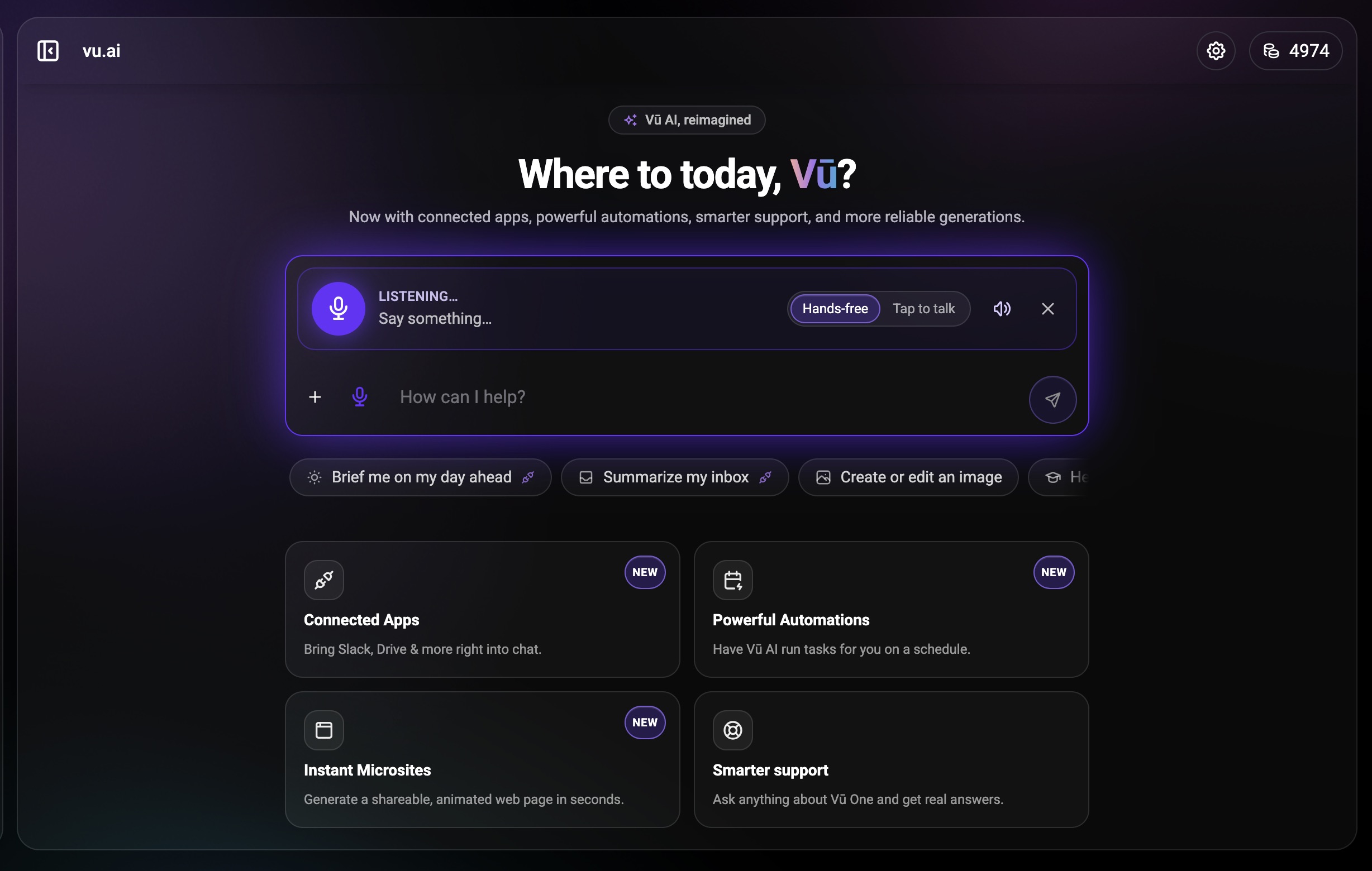
This release brings sound to Vū Studio with uploadable music and audio in scenes, adds playlists you can build from anywhere in your library, and expands the Vū Studio Player desktop app to Windows, macOS, and Linux with proper installers and automatic updates. Vū AI gains a voice mode, and Vū Intelligence sessions gain a consolidated analytics console with a live insights timeline.
Planned maintenance window: Scheduled for the afternoon on release day. There should be no interruption to website availability or your online account.
Highlights
- Music and audio in your library and your scenes. You can now upload MP3s and other music file types into your library, play from a folder of music in the music player, and add audio files to scenes so a soundtrack plays alongside your visuals. (VU-2191, VU-2225)
- Playlists you can build from anywhere. Playlists are no longer limited to folders. You can pull assets from anywhere in your library into a single reorderable playlist, and point multiple slides or scenes at one source asset so updating that asset updates everywhere it plays. Dynamic playlists can also be used as a slide show or a screen saver. (VU-2283, VU-2958)
- The Vū Studio Player desktop app on Windows, macOS, and Linux. The Windows build now ships as a proper installer with a Start Menu entry and a shortcut that survives a restart, and it updates itself automatically the way the macOS and Linux builds already do. The welcome screen also shows the player version and environment, and the window title now uses your player name instead of a generic label. (VU-3031, VU-3004)
- Vū AI voice mode. You can now talk to Vū AI and hear it answer. Microphone input is transcribed into your existing conversation, and responses are spoken as they stream in, so you hear the answer begin instead of waiting for it to finish. Voice mode toggles on inside the existing chat, and falls back to text where your browser does not support it. (VU-2968)
- A consolidated console for Vū Intelligence sessions. Session owners get an Analytics view alongside the immersive live view, with a generated insights dashboard that persists with the session and can be refreshed on demand. Insights can now also be followed as an animated timeline that builds as the conversation goes, as an alternative to the mind map. Live transcription moves to a streaming speech-to-text service with speaker labels where available. (VU-2970, VU-2993, VU-2965) See the guide →
- A monitoring dashboard for your own systems. Admins can now view watchdog data for their systems from a dashboard inside Vū Studio, rather than relying on someone else to check system health for them. (VU-2794)
Improvements
- Change Transform and Scale attributes for every asset in a scene at once from the scene level, while each asset keeps its own individual attributes. (VU-1197) Learn more →
- Drag files onto any folder visible on screen to upload into it, instead of aiming for one specific drop target. (VU-53) See how uploading works →
- Drag a folder onto a display in the dashboard to play its contents as a slide show. A settings modal appears first so you can adjust the defaults before playback starts. (VU-34) Learn how to set it up →
- Copy content from one display and paste it into others, including multi-layer content, from a context menu on the display card or with a right-click. (VU-2918) Learn more about the dashboard →
- Player search in the Display Dashboard now shows each player's current status and keeps it up to date as players come online and go offline. (VU-3014) See the Display Dashboard guide →
- View all dashboard player groups in a list-style view with rows, while keeping multi-select, drag and drop, and every other grouping function. (VU-2957) Learn about player groups →
- Scheduled playback can now wake a sleeping screen as part of the scheduled action. (VU-2710) See the scheduling options →
- Recurring schedules now hold their local time across daylight saving changes instead of drifting by an hour after the clock changes. (VU-2954) Learn how timezones are handled →
- The Media Audit report now records how long each piece of media was visible on screen and the date and time of each individual play, in addition to the existing play counts for a date range. (VU-2875) Learn where to generate it →
- The Team page in the admin area now shows in-use licenses for Vū Media Servers and Web Players along with tokens used, presented the same way as on your personal account page. (VU-2241) See team resource usage →
- Box is now available as a connected integration. (VU-2890) Browse the integrations →
- More Unsplash and Shutterstock results load with each batch, so you scroll less to find a usable image. (VU-1274) Learn more →
- Canvas edit mode can now show the full-size source image instead of the thumbnail, so large images no longer look blurry while you work. (VU-2823) See the Canvas editing options →
- Canvas designs resume at the slide you were on when you refresh or return to the page. (VU-2810) Learn how presenting works →
- The Sessions page has been redesigned to match the Present page, removing a layer of complicated UI from the flow. (VU-2991) See the guide →
- White papers are now generated as regular microsites styled as white papers, so you get full page editing — the element picker, code, images, animation, and an editable table of contents. Existing white papers continue to render as they do today. (VU-2984) Learn more about microsites →
- When you have no assets relevant to your topic, Vū AI can now pull built-in stock imagery into a microsite as a starting point, which you can then swap for other stock images or your own library assets. (VU-3008) See how images work in microsites →
- The meeting agent is now a full Vū Intelligence capture path. When it joins a Zoom, Meet, or Teams call it creates or attaches a session, ingests the transcript in real time so insights generate during the call, carries real participant names through as speakers, and can cast the live mind map back into the meeting. (VU-2974) Learn about calendar sessions →
- The meeting agent webcam view has been simplified, with the latest insight available as an optional screen-share mode. (VU-3093) See how meeting sessions work →
- Vū AI suggestions are more useful and less intrusive: suggestions start in the bottom-right corner, one appears within the first minute so the feature is easier to discover, and display references now name a specific display instead of a generic one. Readability of the home screen schedule block and its sub-details has also been improved. (VU-2942) Learn what Vū AI can do →
- A folder in Vū Studio can be designated as the screen saver slide show for the splash screen. (VU-2961) Learn how to set the screen saver →
- Playlists can be opened and previewed directly in the Remote, so you can review content, order, and playback flow without selecting or connecting a player. (VU-3066)
- HTML files can be uploaded and hosted on microsites. (VU-3042)
- Breakout rooms, device management, sharing, and casting have been restructured in Vū Intelligence sessions. Setup and recording collapse into a single gesture, Devices becomes an expandable panel on the session page with rename and kick, breakout rooms can be created and named with a per-room focus, and casting moves into its own modal with View or Contribute options. (VU-2983)
- The Adjust control can now treat a color you pick as transparent, not just black, so a solid-color background or overlay can be removed without editing the source file. (VU-2046)
- Typing in the Name field on the Register Web Player modal now filters the license list below to matching players. (VU-3082)
- The Web Player now carries the presentation sequencing logic needed to stay in step with Vū Studio playback behavior. (VU-2090)
Fixes
- Linking a Shutterstock account no longer returns an error page — the integration has been updated to comply with Shutterstock's policy. (VU-1884)
- Navigating directly between the Shutterstock and Unsplash sections of the asset library now works, instead of leaving you on the section you started from. (VU-3096)
- Every valid song in the playback list plays audio correctly, and songs that are unavailable or in an unsupported format are skipped or reported instead of failing silently. (VU-2480)
- Clearing a Bento Box template without saving now discards the temporary changes, so casting one of those assets afterward uses its default or last-saved values. (VU-2537)
- Scrolling or interacting with an asset inside a scene now affects only that instance and leaves the original asset's attributes untouched. (VU-2922)
- Assets keep their configured scale, position, and audio settings when you enter Presentation Mode, including with auto-advance. (VU-2540)
- Non-admin users granted permissions to a Vū Media Server in Session Mode can now access it and cast according to those permissions. (VU-2803)
- A sleep command now puts all displays on a media server to sleep. (VU-2818)
- Under certain circumstances the animated background was on for users who had never enabled it; it now correctly defaults to off, which also reduces GPU load and heat on the machine running Vū Studio. (VU-2924)
- Team invites and folder sharing now match email addresses regardless of capitalization, so an invite or share typed with different casing reaches the intended recipient. (VU-2944)
- Layer drag-and-drop reordering in Canvas is more reliable, and the indicator showing where a layer will land is clearer. (VU-2907)
- Changing an image's numeric Width in Canvas now scales the image proportionally instead of cropping the top. (VU-2908)
- Canvas has a hand/pan tool for moving the view while zoomed in, including hold-spacebar to pan. (VU-2909)
- The Hide/Unhide option has been restored to the Canvas pages list, matching the behavior available for layers. (VU-2910)
- Pressing Pause in the Remote now pauses folder playback and holds the current asset until you resume. (VU-2998)
- Pressing Stop in the Remote now resets folder playback to the first asset and stays stopped, instead of ending the cast and showing a black preview. (VU-2999)
- With Loop disabled, pressing Play on a folder shows each asset once and stops after the last one, and opening a second player that is already casting a folder shows the playback controls for that player's current state. An unintended empty space in the Remote layout has also been removed. (VU-3014)
- Assets inside a cast folder now play with their saved configuration instead of reverting to default values. (VU-3088)
- Casting a folder to a Web Player now works in some configurations that previously failed, including when the Display Dashboard and the Web Player are running in different browsers. (VU-3006)
- Casting a folder to the Vū Studio Player desktop app now delivers and displays the folder contents in the configured playback order. (VU-3021)
- YouTube assets play on the Vū Studio Player desktop app. (VU-2979)
- Removing a player from a group is now reflected on the dashboard boards immediately, instead of the player continuing to appear in the group. (VU-3007)
- Web Players sometimes showed as offline in the Display Dashboard while open and running; the dashboard now reflects the player's actual state and updates when it reconnects. (VU-3010)
- The Display Dashboard now shows a clear indicator when a desktop player is in Sleep Mode, so a sleeping device is no longer indistinguishable from one that is offline. (VU-3033)
- Scheduled scenes now reach all assigned online players when the schedule triggers, without requiring a player restart. (VU-2985)
- Recurring scheduled playback no longer shows duplicate upcoming entries in the day view, editing a completed occurrence can no longer re-arm it into an immediate unintended playback, and a series that is interrupted mid-run is recovered instead of quietly stopping. (VU-2949, VU-2950, VU-2952)
- NDI sources presented into Vū Studio keep their native aspect ratio instead of being stretched. (VU-3009)
- Video thumbnails generated by the media processor are no longer always produced at 16:9. (VU-2845)
- A connection to a player can occasionally expire and take a long time to re-establish; reconnection behavior has been corrected. (VU-3083)
- Saving a web link no longer mangles the URL. The proxy toggle has been removed and the proxy is now applied internally only when the URL does not render normally. (VU-3079)
- The Windows player now ships as an installer rather than a portable executable, so it installs properly, keeps its Start Menu entry and shortcut after a restart, and stays registered. (VU-3028)
- Vū AI no longer substitutes an unrelated asset when it cannot resolve the asset you referenced. It asks which asset you meant, never seeds a generation from outside the current conversation, and confirms a reference asset is an image before using it. (VU-3015)
- Vū AI's interface makes better use of wide displays, the Chat and Attachments panels can be resized, asset actions appear on hover or tap, and the prompt bar no longer expands on its own. Suggestions no longer clip at the edges of the list, and the options behind the plus button have been trimmed to Upload, Attach, and Connect. (VU-2982)
- A microsite now creates a new version whenever valid page changes are saved or published, so version history stays accurate and earlier versions can be restored. (VU-3040)
- Vū Intelligence recording works on mobile devices — the audio input format is now compatible with iOS. (VU-3017)
- Removing a device from a session is now clearly communicated in the interface, instead of the device simply stopping. (VU-3018)
- In shared Vū Intelligence sessions the chat sidebar opens as expected, and a meeting that has ended no longer reports itself as paused. (VU-3024)
- Changing a subscription plan now applies the new plan and records the change, rather than the plan-change handler exiting early. (VU-2928)
- Deleting an asset in some cases required a second attempt; the asset is now removed on the first confirmation and the interface updates immediately. (VU-3095)
To view the rest of the release notes click HERE.